
QoraFlow
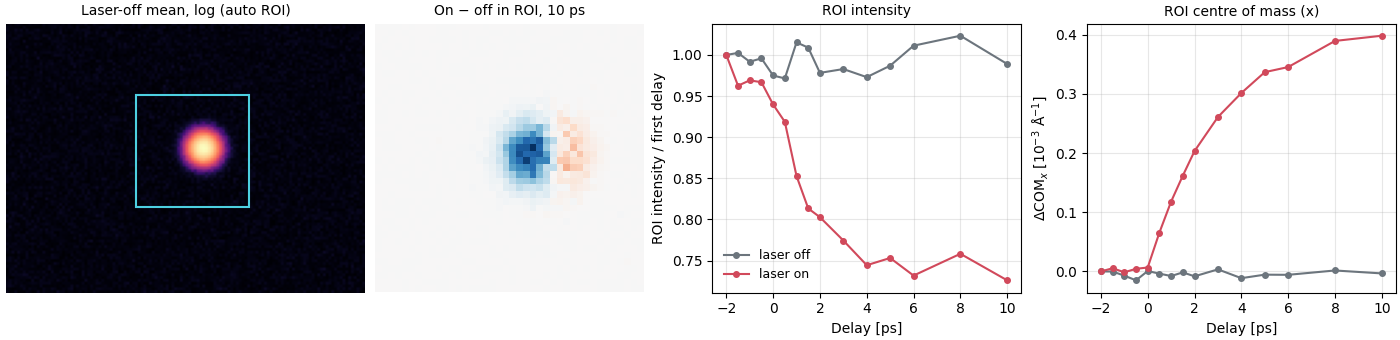
QoraFlow reduces pump-probe X-ray diffraction runs from PAL-XFEL. A laser pumps the sample, an X-ray pulse probes it after a set delay, and the JUNGFRAU detector images, the QBPM intensity-monitor readings and the laser on/off flags land in HDF5 files. QoraFlow matches those by timestamp, splits the shots into laser-on and laser-off, applies dark subtraction, QBPM normalization and LSB quantization, and averages the images per delay into .npz and .mat files. A second step measures the ROI intensity and centre of mass of each averaged image as a function of delay.
The work is done by three scripts run from the repository root, make_dark.py, integrating_main.py and analyzing_main.py, driven by one config.yaml. The library under src/QoraFlow holds the loader, the preprocessors, the integrator and the analyzer they use.
Install
QoraFlow is installed from a clone with uv; the README asks for Python 3.11 to 3.13:
git clone https://github.com/NaNIsaac/QoraFlow.git
cd QoraFlow
uv sync --python 3.13
uv run pytest -q
The scripts import the package from src/, so they run with PYTHONPATH=src from the repository root (see the README's Usage).
First run
The repository ships no measured data. examples/synthetic_pump_probe/run.py writes a synthetic PAL-XFEL scan whose laser response is known, runs make_dark.py and integrating_main.py on it unchanged, measures the ROI with DataAnalyzer.analyze_by_roi, and prints what went in next to what came out:
PYTHONPATH=src uv run python examples/synthetic_pump_probe/run.pyThe scan has one Gaussian Bragg peak on a 96 x 128 detector with a dark pedestal, Poisson noise and 15 % QBPM fluctuations; for delays after zero the laser-on peak loses up to 25 % of its intensity and moves up to 1.5 pixels along x. After the integration log, the output ends with:
 delay ps  ratio in ratio out  dx in px dx out px
     -1.0     1.000     1.000     0.000     0.000
      0.0     1.000     0.987     0.000     0.014
      2.0     0.816     0.798     0.730     0.689
      6.0     0.755     0.739     1.297     1.241
     10.0     0.750     0.743     1.446     1.366
1 px = 2.865e-04 1/Angstrom at the config geometry
ratio is the laser-on over laser-off ROI intensity and dx the shift of the ROI centre of mass along x between the two, injected and measured. The measured shift is about 5 % low. The images still carry a flat background after dark subtraction (the synthetic data have a weak uniform photon floor), and a flat background pulls a centre of mass toward the middle of the ROI (QoraFlow#28). analyze_by_roi can remove it before the centre of mass is taken; on the same scan, with the default edge_width of 3 pixels:
background= | dx at 2 ps | 6 ps | 10 ps |
|---|---|---|---|
None (default) | 0.689 | 1.241 | 1.366 |
"edge" (median of the ROI border) | 0.729 | 1.312 | 1.442 |
"plane" (least-squares plane through the border) | 0.740 | 1.312 | 1.438 |
| injected | 0.730 | 1.297 | 1.446 |
The intensity ratios do not change: the background option applies to the centre of mass only. The example's README explains what the test around it checks and its limits.
Where to go next
- Reduction pipeline, on this site: what each step does to the data, in order, from the raw HDF5 files to the ROI table.
- The README's Usage:
config.yaml, the three scripts, the raw file layout, and the Qt ROI selector. - Validation in the README, and the synthetic example above.
- The Python API page lists the public functions and classes of the
QoraFlowpackage with their docstrings.